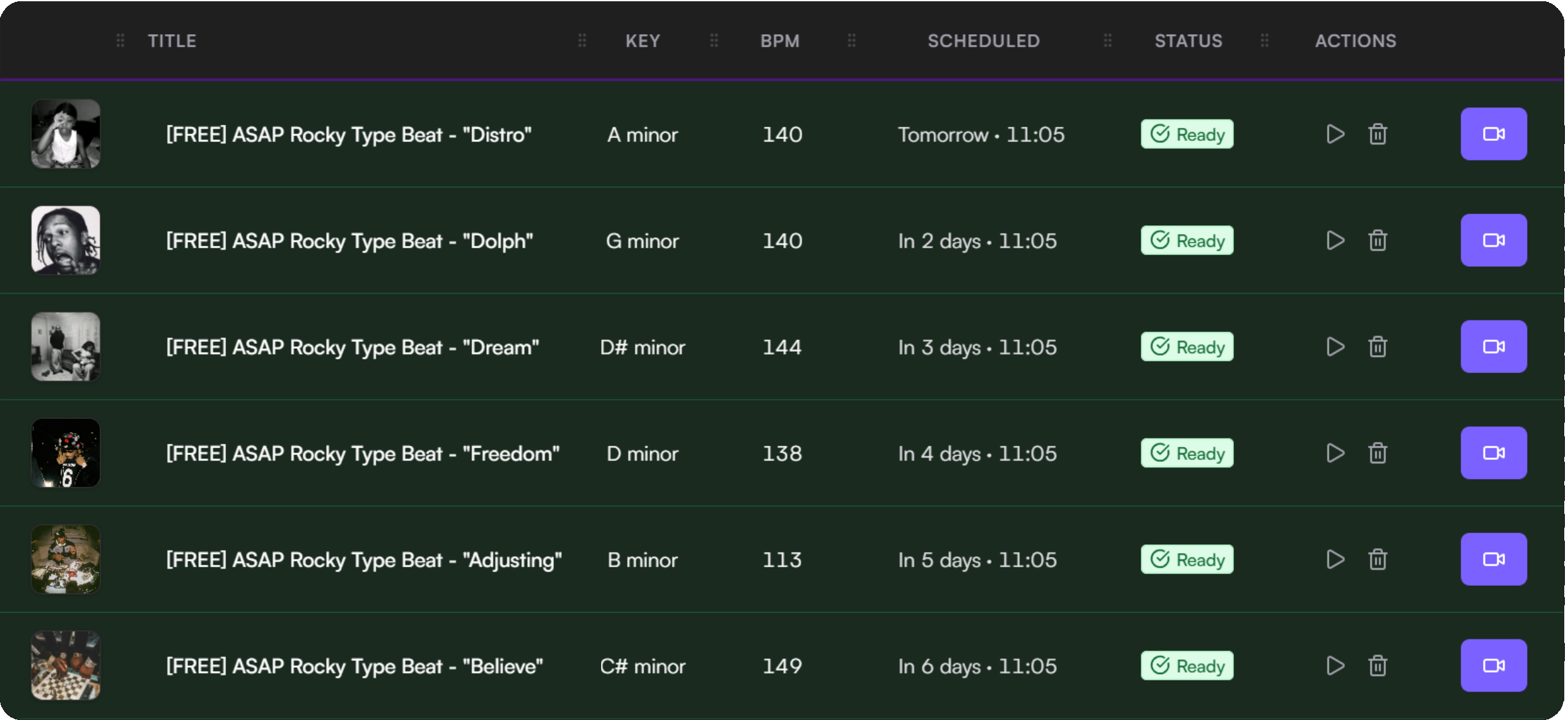
Automate your YouTube beat uploads.

BeatLoadr turns your workflow into a simple pipeline - upload audio in batches, auto-detect BPM & key, generate metadata from templates, render videos, and publish to YouTube on schedule.

No credit card required · Connect via secure YouTube OAuth · Cancel anytime

January Type Beats

12 tracks

TRACKS

Midnight Drive.wav

✓ Ready

Summer Nights.wav

⏳ Processing...

City Lights.mp3

✓ Ready

METADATA

Title

Midnight Drive - Type Beat

BPM

142

Key

C# min

Tags

type beatdarkmelodic

SCHEDULE

Feb 06, 2026

📅 Scheduled

Feb 13, 2026

Available

Feb 20, 2026

Available

Trusted workflow essentials

YouTube OAuth

Stripe

PayPal

GDPR

Data deletion

Manual uploading is a momentum killer.

Uploading one-by-one takes hours every week.

Titles, descriptions, and tags get repetitive - and inconsistent.

Scheduling is easy to skip when life gets busy.

Rendering videos becomes the bottleneck.

BeatLoadr keeps your channel consistent.

Organize beats in batches, let BeatLoadr generate clean metadata automatically, schedule weeks of uploads in minutes, and track every render and upload in one place.

Everything you need - nothing you don't.

A complete toolkit for managing your YouTube beat uploads.

📦

Batch Management

Upload 20 beats in one go

Organize tracks, upload audio and artwork, and edit metadata inline.

🎵

BPM & Key Detection

Auto-detect in seconds

Automatic analysis saves time and improves consistency across uploads.

✏️

Smart Templates

Generate titles automatically

Use variables like {{track.title}}, {{track.bpm}}, and {{track.musical_key}}.

📅

Upload Calendar

Plan weeks ahead visually

Drag beats onto dates, preview scheduled uploads, and stay organized.

🎬

Video Rendering Queue

Generate videos automatically

Clear statuses and progress tracking for every render.

📺

YouTube Publishing

Upload with one click

Securely connect your channel - metadata included.

Explore all features →

From audio file to published video - end to end.

Six simple steps that run on autopilot.

1

Upload beats

2

Auto-analyze BPM & key

3

Apply templates for metadata

4

Schedule uploads on calendar

5

Render videos in queue

6

Publish to YouTube automatically

Spend less time on repetitive steps - and more time making beats.

Always know what's left this month.

See uploads, renders, and storage at a glance with clear usage bars and real-time status indicators.

Uploads used

0 / 30

Renders used

0 / 60

Storage

0.0 GB / 10 GB

Start free. Upgrade when you're ready.

Choose a plan based on how often you upload - no hidden fees.

Built for trust and control.

Your data, your channel, your control - secured with industry-standard practices.

Secure OAuth

No password sharing - connect via YouTube OAuth

Trusted Payments

Payments handled by Stripe or PayPal

Full Control

Delete your account and wipe data anytime

Built to help producers stay consistent.

BeatLoadr exists to remove repetitive work from beat marketing - so you can spend more time creating and less time uploading.

Automation-first

Remove busywork so you can focus on creating beats, not managing uploads.

Creator control

Clear permissions and data ownership. Revoke access anytime.

Reliability

Visible status and predictable workflows you can depend on.

Common questions

Do you store my YouTube password?

Never. You connect using YouTube OAuth.

Can I schedule uploads in advance?

Yes. Drag and drop beats onto dates and plan weeks ahead.

Does it support my audio format?

Upload MP3, WAV, FLAC, M4A, AAC, and OGG files.

Can I cancel anytime?

Yes. You can downgrade or cancel whenever you want.

View all questions →

Make your channel consistent - without extra work.

Start free and turn uploads into a scheduled pipeline.